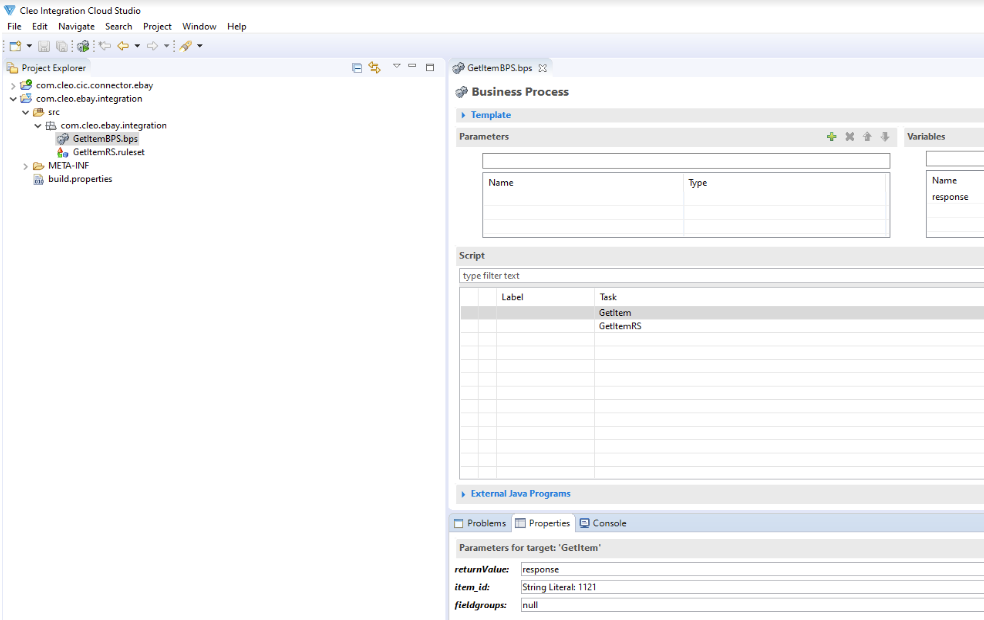
Below is an example showing how the eBay Connector Business Process can be used. In the following example, the GetItem.bps (from the Connector Project) is used to retrieve details of a specific item. This is followed by a step (Ruleset) that will then transform the received data.
Steps to create the Connector and Integration Projects
- Create an eBay Connector project.
- Create an Integration Project (CIC Project).
- Set the Connector Project as a dependency in the Integration Project.
- To perform an operation using the Connector BP and Schemas, follow the steps below:
- Create a Business Process.
- Create a task in the above Business Process to include the Business Process from the Connector project, i.e. GetItem.bps.
-
Create another task in the Business Process referencing a Ruleset that will map from JSON to any supported schema. All the connector schemas (request and response) will be in JSON format. In this Ruleset, map the required fields.
Note: If XEBAYCMARKETPLACEID is present in the parameter list, please go to https://developer.eBay.com/api-docs/static/rest-request-components.html#marketpl and find the appropriate Marketplace ID from the Marketplace ID values section. (for example, EBAY_GB for Great Britain). Use the same Marketplace ID for XEBAYCMARKETPLACEID parameter as shown in the example below.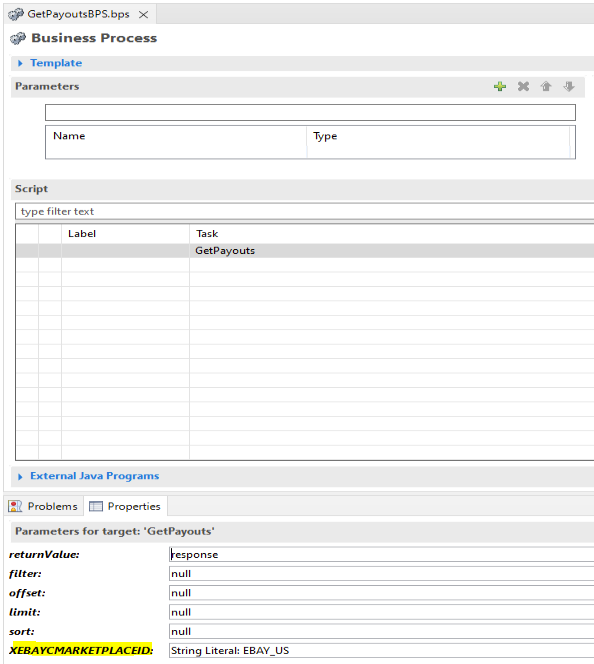
Comments
0 comments
Please sign in to leave a comment.